
| Handle Clamp Assembly & Alignment |
|---|
| 11. Place the Handle Clamp on the Projector Handle and ensure both sides are vertical. Adjust small nuts as needed to ensure both Handle Clamp sides are vertical.
12. Thread two large nuts on each front bolt but do not tighten. 13. Insert Rear Bolt in either upper or lower hole and attach a large nut, but do not tighten. 14. Gently squeeze the Handle Clamp and hand-tighten two front large nuts. With Rear bolt loose, the Handle Clamp should slide on/off the Projector Handle and feel "snug" but not "tight" - adjust the two sides to achieve correct fit. 15. Use tools and firmly tighten all the nuts on the two front bolts which secure the Support and Right half. Double check the Handle Clamp fits properly. 16. Gently tighten Rear bolt to adequately secure Handle Clamp to Projector Handle. Use only the Rear bolt to tighten/loosen the Handle Clamp. |
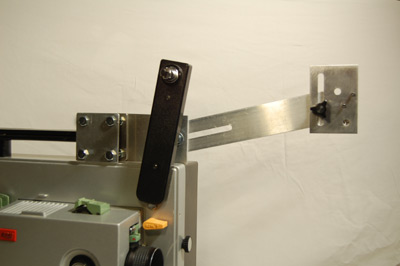 |
| Do Not Over-Tighten Handle Clamp. Use only enough force to prevent the Handle Clamp from shifting. Avoid undue stress to the Projector Handle. |
| previous | next |
 |